GitHub Integration - Repo Events & CI/CD Alerts
Set up GitHub webhooks with Echobell to get instant mobile alerts for pull requests, issues, releases, and failed CI/CD workflow runs.
GitHub is the world's leading platform for version control and collaboration, used by millions of developers. This guide shows you how to integrate GitHub webhooks with Echobell to receive instant notifications for repository events - from pull requests and commits to releases and workflow runs.
If you are seeking instant notifications from GitHub Action, you can use Echobell Notification Action to send notifications directly from GitHub Actions.
Prerequisites
- An Echobell account with an active channel
- Admin access to the GitHub repository you want to monitor
- Your Echobell webhook URL (found in your channel's details view)
Setting Up GitHub Webhooks
1. Create an Echobell Channel
- Open the Echobell app
- Create a new channel (e.g., "GitHub Notifications")
- Configure notification templates:
Title Template:
[{{repository.name}}] {{action}} by {{sender.login}}
Body Template:
🔔 Event: {{action}}
👤 Actor: {{sender.login}}
📦 Repository: {{repository.full_name}}
2. Get Your Webhook URL
- In your channel settings, locate the Triggers section
- Copy the webhook URL provided
- Keep this URL secure as it will be used in GitHub's configuration
3. Configure GitHub Webhook
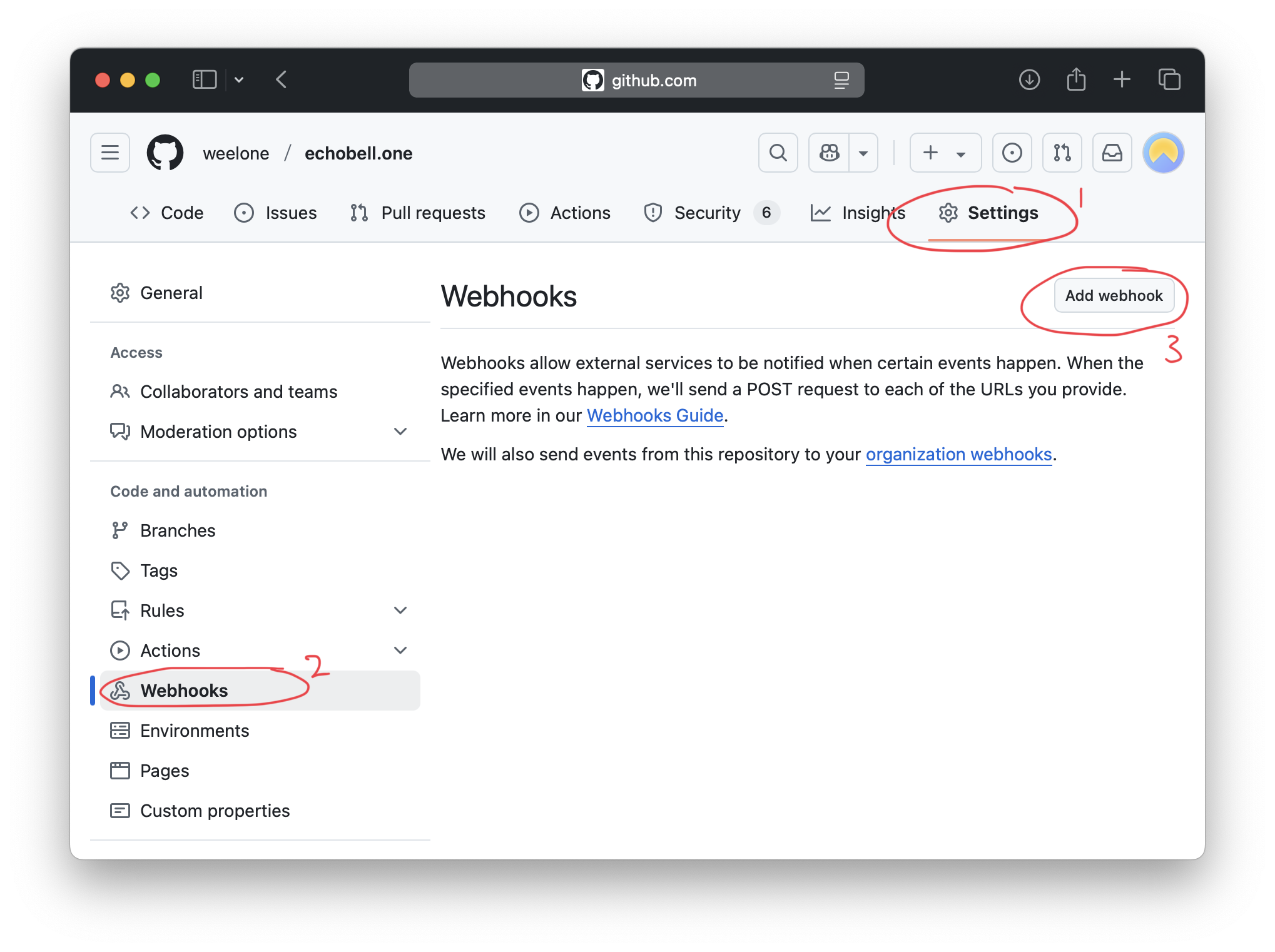
- Go to your GitHub repository
- Navigate to Settings → Webhooks
- Click Add webhook
- Configure the webhook:
- Payload URL: Your Echobell webhook URL
- Content type:
application/json - Secret: (Optional) Add a secret token for additional security
- Enable SSL verification
- Choose which events to trigger the webhook:
- Select "Let me select individual events"
- Common choices include:
- Pull requests
- Push events
- Issues
- Discussions
- Releases
- Click Add webhook to save
Testing Your Integration
- After setting up the webhook, GitHub will send a ping event
- Check your Echobell notifications to confirm receipt
- Create a test issue or pull request to verify the integration
Best Practices
- Security:
- Keep your webhook URL confidential
- Use a webhook secret for verified requests
- Enable SSL verification
- Event Selection:
- Only subscribe to events you need
- Consider repository size and activity when selecting events
- Error Handling:
- Monitor webhook delivery status in GitHub
- Check Echobell's notification history for successful delivery
Troubleshooting
If you're not receiving notifications:
- Verify the webhook URL is correct
- Check GitHub's webhook delivery history for errors
- Ensure your Echobell channel is active
- Verify you have active subscribers in your channel
- Check if the selected events are being triggered
Privacy and Security
- Webhook URLs should be treated as secrets
- Only send necessary event data
- All notification content is stored locally on subscribers' devices
- Our servers only process the webhook request and route notifications
Need help? Visit our Support Center or contact us at echobell@weelone.com.